Configure an OpenAI WIF Credential Provider
Aembit’s Credential Provider: Credential Providers obtain the specific access credentials—such as API keys, OAuth tokens, or temporary cloud credentials—that Client Workloads need to authenticate to Server Workloads.Learn more for OpenAI Workload Identity Federation (WIF) lets your Client Workload: Client Workloads represent software applications, scripts, or automated processes that initiate access requests to Server Workloads, operating autonomously without direct user interaction.Learn more authenticate to the OpenAI API with short-lived tokens instead of long-lived API keys. Aembit obtains those tokens on the Client Workload’s behalf. Aembit acts as a third-party federated Identity Provider (IdP), and OpenAI trusts Aembit as an OpenID Connect (OIDC): An identity layer built on top of OAuth 2.0 that lets applications verify the identity of a user or workload and obtain basic profile information using JSON Web Tokens (JWTs).Learn more(opens in new tab) issuer. When an Access Policy: Access Policies define, enforce, and audit access between Client and Server Workloads by cryptographically verifying workload identity and contextual factors rather than relying on static secrets.Learn more grants a Client Workload access, Aembit exchanges its issued assertion for a short-lived OpenAI access token.
You can configure the OpenAI Credential Provider using the Aembit Tenant or through the Aembit Terraform provider.
Prerequisites
Section titled “Prerequisites”To configure an OpenAI WIF Credential Provider, you’ll need the following:
- Ability to access and manage your Aembit Tenant: Aembit Tenants serve as isolated, dedicated environments within Aembit that provide complete separation of administrative domains and security configurations.Learn more.
- An OpenAI organization owner role, which OpenAI requires to configure Workload Identity Federation. You create a Workload Identity Provider and a service account mapping in your OpenAI organization. See the OpenAI Workload Identity Federation documentation.
- Your Aembit OIDC Issuer URL is publicly reachable over HTTPS (port 443). OpenAI performs OIDC discovery and JWKS retrieval against this URL.
- Terraform only:
- You have Terraform installed.
- You have the Aembit Terraform Provider configured.
Configure a Credential Provider for OpenAI
Section titled “Configure a Credential Provider for OpenAI”This section explains how to configure an OpenAI WIF Credential Provider in the Aembit Tenant. You create the Credential Provider in your Aembit Tenant, configure the matching federation trust in OpenAI, then return to your Aembit Tenant to finish and verify.
Create a Credential Provider
Section titled “Create a Credential Provider”-
Log in to your Aembit Tenant and click Credential Providers.
-
Click + New, which reveals the Credential Provider page.
-
Enter a Name and optional Description.
-
In the Credential Type dropdown, select OpenAI API Workload Identity Federation, revealing new fields.
-
Copy the OIDC Issuer URL.
Aembit auto-generates this read-only value as a dedicated endpoint for OIDC authentication with OpenAI. You’ll use it when you register Aembit as a federation issuer in OpenAI in the next section.
Keep the Aembit Tenant open while you configure the federation trust in OpenAI.
Configure the federation trust in OpenAI
Section titled “Configure the federation trust in OpenAI”In OpenAI, create a Workload Identity Provider that trusts Aembit as the OIDC issuer. Then add a service account mapping that authorizes Aembit’s tokens to mint access tokens for an OpenAI service account.
Follow OpenAI’s Workload Identity Federation documentation to complete this setup, with a few things to note for Aembit:
- Set the provider’s OIDC Issuer URL to the Aembit OIDC Issuer URL you copied in the previous section.
Keep the default key source of OIDC discovery.
Aembit’s OIDC Issuer URL serves the
.well-known/openid-configurationendpoint that OpenAI uses for discovery, so you don’t need to upload a JWKS. - If you leave the provider’s Audience blank, OpenAI defaults it to
https://api.openai.com. The Aembit Credential Provider screen applies the same default, so the two values match. If you set a custom Audience, enter the same value in Aembit in the next section. - In the service account mapping, match the
subclaim that Aembit’s token presents, set toworkloadId:*. OpenAI issues a token only when exactly one enabled mapping matches. It rejects the exchange when no mapping matches or when more than one does, so keep your mappings unambiguous.
As you configure OpenAI, record the following values, which you’ll enter in Aembit in the next section:
- Workload Identity Provider ID - OpenAI generates this when you create the Workload Identity Provider; its ID
starts with
idp_. - Service Account ID - the OpenAI service account your mapping authorizes; its ID starts with
user-.
Complete the Credential Provider in the Aembit Tenant
Section titled “Complete the Credential Provider in the Aembit Tenant”Return to the Aembit Tenant and complete the Credential Provider page with the values from OpenAI. For a field-by-field reference, see OpenAI and Credential Provider UI value mappings.
-
For Identity Provider ID, enter the Workload Identity Provider you recorded from OpenAI; its ID starts with
idp_. -
For Service Account ID, enter the service account you recorded from OpenAI; its ID starts with
user-. -
For Audience, enter the same Audience value you set on the Workload Identity Provider in OpenAI.
Leave this field blank to use the default
https://api.openai.com, which matches OpenAI’s default when you also leave its Audience blank.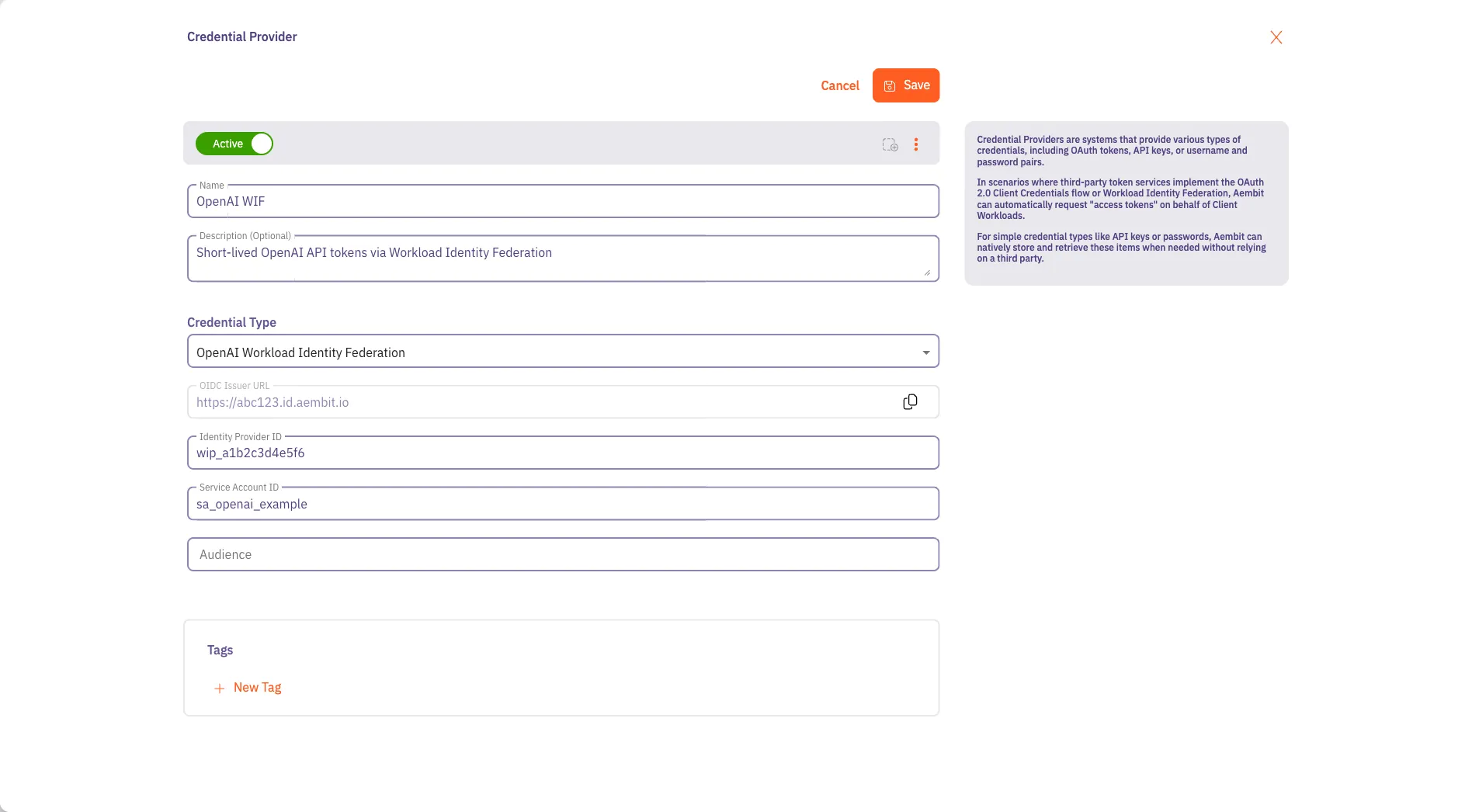
-
Click Save.
Your OpenAI WIF Credential Provider now displays in your list of Credential Providers in the Aembit Tenant.
Verify the connection
Section titled “Verify the connection”To verify the connection between your Aembit Credential Provider and your OpenAI federation setup:
-
On the Credential Providers page, select the Credential Provider you just created.
-
Click Verify.
After a few moments, you should see a green banner display a “Verified Successfully” message.
If verification fails, recheck the values in your Aembit Credential Provider against the Workload Identity Provider, service account, and mapping in OpenAI. A failure often points to an issuer or audience mismatch, or to a mapping that matches no token or more than one token.
You’re now ready to use your Credential Provider for OpenAI Workload Identity Federation with your Server Workload: Server Workloads represent target services, APIs, databases, or applications that receive and respond to access requests from Client Workloads.Learn more in an Aembit Access Policy. To configure OpenAI as a Server Workload, see the ChatGPT (OpenAI) guide.
Configure OpenAI WIF using the Aembit Terraform provider
Section titled “Configure OpenAI WIF using the Aembit Terraform provider”To configure an OpenAI WIF Credential Provider using the Aembit Terraform Provider, follow the steps in this section.
The following configuration is an example.
For the authoritative, current argument reference, including required and optional fields, default values, and any new
arguments, see the
aembit_credential_provider resource
in the Terraform Registry.
-
Create a new Terraform configuration file (such as
openai-wif.tf) following this example structure.provider "aembit" {}resource "aembit_credential_provider" "openaiWif" {name = "<Desired Credential Provider Name>"is_active = trueopenai_wif = {identity_provider_id = "<Workload Identity Provider ID from OpenAI>"service_account_id = "<Service Account ID from OpenAI>"audience = "<Optional audience your mapping expects>"}} -
Apply the Terraform configuration:
Terminal window terraform apply -
Copy the OIDC Issuer URL for the new Credential Provider from the Aembit Tenant, then use it in OpenAI when you register Aembit as a Workload Identity Provider.
You’re now ready to use your Credential Provider for OpenAI Workload Identity Federation with your Server Workloads in an Aembit Access Policy.
OpenAI and Credential Provider UI value mappings
Section titled “OpenAI and Credential Provider UI value mappings”The following table shows how the values in your OpenAI WIF configuration map to the Aembit Credential Provider web UI and Terraform provider:
| Aembit Credential Provider value | OpenAI WIF configuration | Terraform value |
|---|---|---|
| OIDC Issuer URL | Workload Identity Provider OIDC Issuer URL | Not exposed (copy from UI) |
| Identity Provider ID | Workload Identity Provider ID (idp_) | identity_provider_id |
| Service Account ID | Mapping Service account (user-) | service_account_id |
| Audience | Workload Identity Provider Audience | audience |
Limitations
Section titled “Limitations”- No Admin API access. You can’t use OpenAI WIF access tokens to call OpenAI Admin API endpoints.
- Token lifetime. OpenAI access tokens expire after at most one hour and can’t outlive the Aembit-issued token used for the exchange.
- OpenAI organization limits. OpenAI allows up to 50 Workload Identity Providers per organization and up to 50 service account mappings per provider.