Configure a Claude WIF Credential Provider
Aembit’s Credential Provider for Claude Workload Identity Federation (WIF) lets your Client Workloads authenticate to the Claude API with short-lived tokens instead of long-lived API keys. Aembit obtains those tokens on the workload’s behalf. Aembit acts as a third-party federated Identity Provider (IdP), and Claude trusts Aembit as an OIDC issuer. When an Access Policy grants a Client Workload access, Aembit exchanges its issued assertion for a short-lived Claude access token.
You can configure the Claude Credential Provider using the Aembit web UI or through the Aembit Terraform provider.
Prerequisites
Section titled “Prerequisites”To configure a Claude WIF Credential Provider, you’ll need the following:
- Ability to access and manage your Aembit Tenant.
- Ability to access and manage a Claude Console organization, service account, and federation rule. See the Anthropic Workload Identity Federation documentation.
- Your Aembit OIDC Issuer URL is publicly reachable over HTTPS (port 443). Claude performs OIDC discovery and JWKS retrieval against this URL.
- Terraform only:
- You have Terraform installed.
- You have the Aembit Terraform Provider configured.
Configure a Credential Provider for Claude
Section titled “Configure a Credential Provider for Claude”This section explains how to configure a Claude WIF Credential Provider in the Aembit web UI. You create the Credential Provider in Aembit, configure the matching federation trust in Claude Console, then return to Aembit to finish and verify.
Create a Credential Provider
Section titled “Create a Credential Provider”-
Log in to your Aembit Tenant and click Credential Providers.
-
Click + New, which reveals the Credential Provider page.
-
Enter a Name and optional Description.
-
In the Credential Type dropdown, select Claude Workload Identity Federation, revealing new fields.
-
Copy the OIDC Issuer URL.
Aembit auto-generates this read-only value as a dedicated endpoint for OIDC authentication with Claude. You’ll paste it into Claude Console in the next section.
Keep the Aembit web UI open while you configure the federation trust in Claude Console.
Configure the federation trust in Claude Console
Section titled “Configure the federation trust in Claude Console”In Claude Console, use the OIDC Issuer URL you copied from Aembit to register Aembit as a federation issuer. Then create the service account and federation rule that Aembit’s tokens map to.
Follow the Anthropic Workload Identity Federation and WIF reference documentation to complete this setup, with two things to note for Aembit:
- When you register the issuer, choose the generic OIDC option rather than the AWS or Google Cloud presets.
Keep the default JWKS source of Discovery.
Aembit’s OIDC Issuer URL serves the
.well-known/openid-configurationendpoint that Claude uses for discovery. - When you create the federation rule, its match conditions must match the claims in the token Aembit presents. If you set an audience match condition, it must equal the Audience value you enter in Aembit in the next section.
As you configure Claude Console, record the following values, which you’ll enter in Aembit in the next section:
- Federation Rule ID - your Claude federation rule ID, which starts with
fdrl_. - Organization ID - your Claude organization ID, formatted as a UUID.
- Service Account ID - your Claude service account ID, which starts with
svac_. - Workspace ID - your Claude workspace ID, which starts with
wrkspc_.
Complete the Credential Provider in the Aembit web UI
Section titled “Complete the Credential Provider in the Aembit web UI”Return to the Aembit web UI and complete the Credential Provider page with the values from Claude Console:
-
For Federation Rule ID, enter the federation rule you recorded from Claude Console; its ID starts with
fdrl_. -
For Organization ID, enter your Claude organization ID.
-
For Scope, leave the default value of
workspace:developer. -
For Service Account ID, enter the service account you recorded from Claude Console; its ID starts with
svac_. -
For Audience, enter the
audvalue your federation rule expects.Leave this field blank unless your federation rule requires a specific audience.
-
For Workspace ID, enter the workspace you recorded from Claude Console; its ID starts with
wrkspc_.If your federation rule covers more than one workspace, enter this value; otherwise, the token exchange fails with a
workspace_id_requirederror. If the rule covers a single workspace, leave it blank and Claude scopes the token to that workspace. -
For Lifetime, keep the default of
3600seconds or enter the duration, in seconds, for which credentials remain valid.The value must be between
300and43200seconds.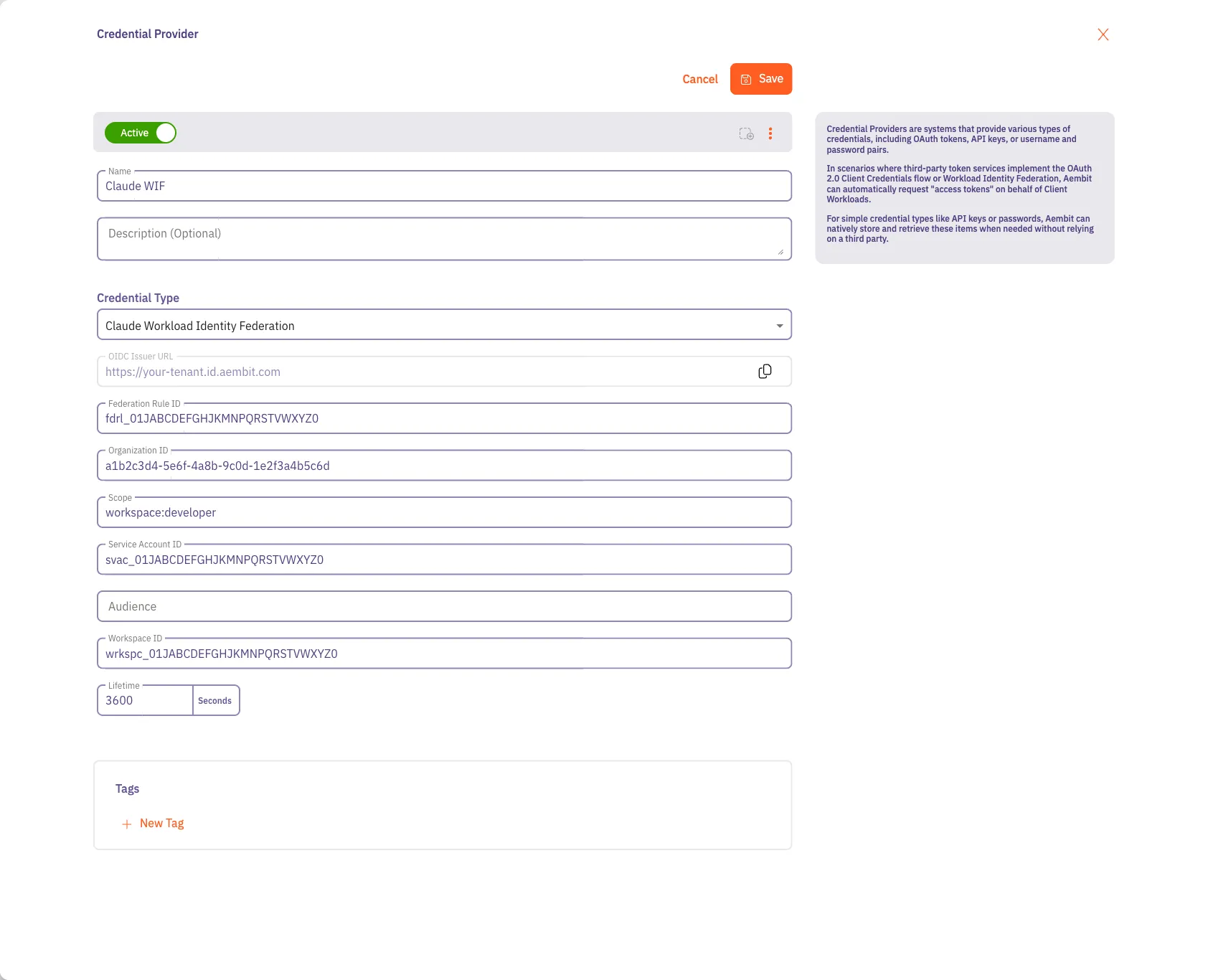
-
Click Save.
Your Claude WIF Credential Provider now displays in your list of Credential Providers in the Aembit web UI.
Verify the connection
Section titled “Verify the connection”To verify the connection between your Aembit Credential Provider and your Claude federation rule:
-
On the Credential Providers page, select the Credential Provider you just created.
-
Click Verify.
After a few moments, you should see a green banner display a “Verified Successfully” message.
If verification fails, recheck the values in your Aembit Credential Provider against the federation rule, service account, and organization in Claude Console.
You’re now ready to use your Credential Provider for Claude Workload Identity Federation with your Server Workloads in an Aembit Access Policy. To configure Claude as a Server Workload, see the Claude guide.
Configure Claude WIF using the Aembit Terraform provider
Section titled “Configure Claude WIF using the Aembit Terraform provider”To configure a Claude WIF Credential Provider using the Aembit Terraform Provider, follow the steps in this section.
The following configuration is an example.
For the authoritative, current argument reference, including required and optional fields, default values, and any new
arguments, see the
aembit_credential_provider resource
in the Terraform Registry.
-
Create a new Terraform configuration file (such as
claude-wif.tf) following this example structure.In the
claude_wifblock,federation_rule_id,organization_id, andservice_account_idare required. Theaudience,scope, andworkspace_idfields are optional. If you omitscope, it defaults toworkspace:developer;audienceandworkspace_idare null when omitted. Aembit requireslifetimeand defaults it to3600seconds.provider "aembit" {}resource "aembit_credential_provider" "claudeWif" {name = "<Desired Credential Provider Name>"is_active = trueclaude_wif = {federation_rule_id = "<Federation Rule ID from Claude Console>"organization_id = "<Organization ID from Claude Console>"service_account_id = "<Service Account ID from Claude Console>"audience = "<Optional audience your federation rule expects>"scope = "workspace:developer"workspace_id = "<Optional Workspace ID from Claude Console>"lifetime = 3600}}The
lifetimevalue sets the lifetime, in seconds, of the Aembit-issued OIDC token used to authenticate to Claude. It must be between300and43200seconds. The lifetime of the resulting Claude access token is managed within the Claude platform. -
Apply the Terraform configuration:
Terminal window terraform apply -
Copy the OIDC Issuer URL for the new Credential Provider from the Aembit web UI, then use it in Claude Console when you register Aembit as a federation issuer.
You’re now ready to use your Credential Provider for Claude Workload Identity Federation with your Server Workloads in an Aembit Access Policy.
Claude and Credential Provider UI value mappings
Section titled “Claude and Credential Provider UI value mappings”The following table shows how the values in your Claude WIF configuration map to the Aembit Credential Provider web UI and Terraform provider:
| Aembit Credential Provider value | Claude WIF configuration | Terraform value |
|---|---|---|
| OIDC Issuer URL | Federation issuer issuer_url | Not exposed (copy from UI) |
| Federation Rule ID | federation_rule_id (fdrl_) | federation_rule_id |
| Organization ID | organization_id (UUID) | organization_id |
| Scope | Federation rule oauth_scope | scope |
| Service Account ID | service_account_id (svac_) | service_account_id |
| Audience | Federation rule match.audience | audience |
| Workspace ID | workspace_id (wrkspc_) | workspace_id |