Aembit Client ID
The Aembit Client ID method serves as a fallback for Client Workload identification when other suitable methods are unavailable. This method entails generating a unique ID by the Aembit Cloud, which is then provisioned to the Client Workload.
Applicable deployment type
Section titled “Applicable deployment type”This method is suitable for Aembit Edge-based deployments.
Configuration
Section titled “Configuration”Aembit Cloud
Section titled “Aembit Cloud”- Create a new Client Workload.
- Choose “Aembit Client ID” for client identification.
- Complete the remaining fields.
- Copy the newly generated ID that Aembit displays for the Aembit Client ID identifier.
- Save the Client Workload.
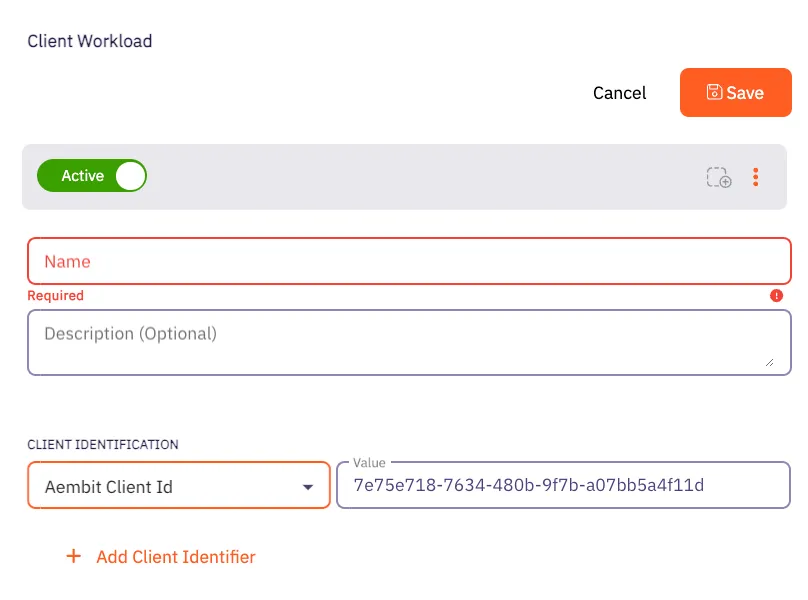
Client Workload
Section titled “Client Workload”Virtual machine deployment
Section titled “Virtual machine deployment”During Agent Proxy installation, specify the CLIENT_WORKLOAD_ID environment variable.
CLIENT_WORKLOAD_ID=<ClientWorkloadID> AEMBIT_TENANT_ID=<TenantID> AEMBIT_AGENT_CONTROLLER_ID=<AgentControllerId> ./installKubernetes
Section titled “Kubernetes”Add the aembit.io/agent-inject annotation to your Client Workload.
See the following example:
apiVersion: apps/v1kind: Deploymentmetadata: name: example-appspec: replicas: 1 selector: matchLabels: app: example-app template: metadata: labels: app: example-app annotations: aembit.io/agent-inject: "enabled" aembit.io/client-id: "7e75e718-7634-480b-9f7b-a07bb5a4f11d"