How to enable mTLS on a Server Workload
Agent Proxy can establish outbound mTLS: Mutual Transport Layer Security. A TLS handshake in which both the client and server present certificates and validate each other's identity before any application traffic flows. mTLS is commonly used for workload-to-workload authentication where both parties must prove identity at the transport layer.Learn more connections to your Server Workload: Server Workloads represent target services, APIs, databases, or applications that receive and respond to access requests from Client Workloads.Learn mores using SPIFFE-compliant X.509-SVID: A SPIFFE Verifiable Identity Document in X.509 certificate format. X.509-SVIDs are certificates that embed a workload's SPIFFE ID as a URI Subject Alternative Name (SAN) and enable mutual TLS authentication between workloads. Aembit issues SVIDS with short lifetimes and automatic rotation.Learn more certificates. Agent Proxy generates the private key in memory, obtains a signed leaf certificate and chain from Aembit Cloud, and presents the certificate during the Transport Layer Security (TLS) handshake.
This page describes the end-to-end workflow and walks through the Server Workload side of the configuration. The matching Credential Provider: Credential Providers obtain the specific access credentials—such as API keys, OAuth tokens, or temporary cloud credentials—that Client Workloads need to authenticate to Server Workloads.Learn more configuration lives at Create an X.509-SVID Credential Provider.
Prerequisites
Section titled “Prerequisites”Before you enable mTLS on a Server Workload, you must have the following:
- Agent Proxy v1.31 or later.
- An X.509-SVID Credential Provider is configured in your Aembit Tenant. See Create an X.509-SVID Credential Provider.
- A Standalone Certificate Authority is available to sign X.509-SVID certificates.
- The destination Server Workload supports validating SPIFFE-compliant X.509-SVID certificates.
- The Server Workload uses the HTTP application protocol.
Enable mTLS
Section titled “Enable mTLS”To enable mTLS on a Server Workload, configure the Server Workload’s authentication method and then create the Access Policy that connects your Client Workload: Client Workloads represent software applications, scripts, or automated processes that initiate access requests to Server Workloads, operating autonomously without direct user interaction.Learn more to it.
Configure the mTLS Authentication method
Section titled “Configure the mTLS Authentication method”The Server Workload must use the mTLS Authentication method so that it validates the client certificate the Agent Proxy presents.
-
Log into your Aembit Tenant.
-
Click Server Workloads.
-
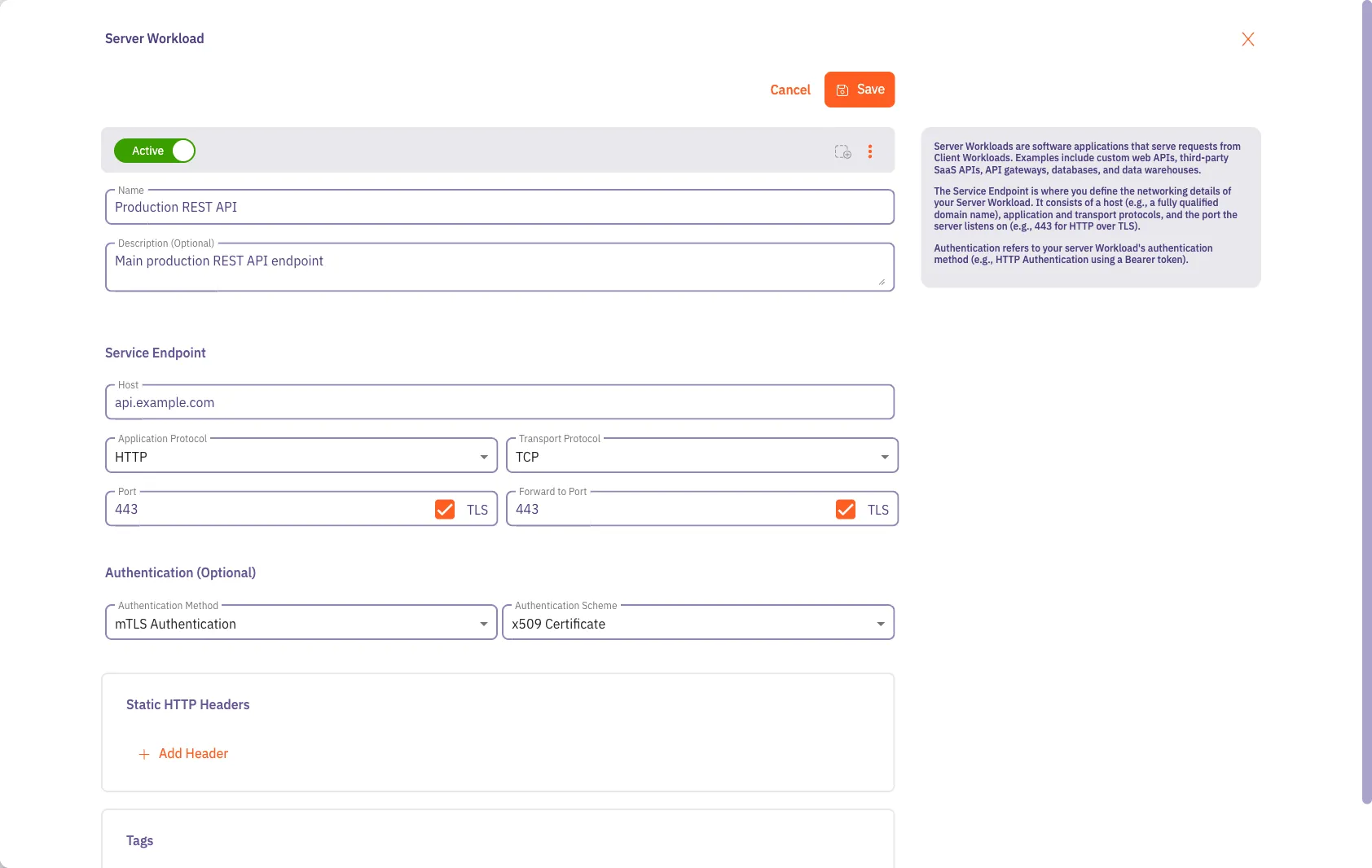
Create a new Server Workload, or select an existing Server Workload from the list and click Edit.
-
Under Authentication, select mTLS Authentication. Aembit sets the Scheme to x509 Certificate.
-
Click Save.
For details on Server Workload authentication methods, see Authentication methods and schemes.
Create the Access Policy
Section titled “Create the Access Policy”Connect your Client Workload to the Server Workload using an X.509-SVID Credential Provider.
-
In the Aembit Tenant, click Access Policies in the left sidebar, then click + New.
-
For Client Workload, select the workload that originates the mTLS connection.
-
For Server Workload, select the workload you configured for mTLS Authentication.
-
For Credential Provider, select your X.509-SVID Credential Provider.
-
Click Save, then activate the policy.
When the Client Workload next initiates a connection through Agent Proxy, the proxy fetches a signed X.509-SVID certificate, completes the mTLS handshake with the Server Workload, and proxies the connection.