Configure MCP User-Based Access Token Credential Provider
The MCP User-Based Access Token Credential Provider retrieves and manages OAuth 2.0 credentials on a per-user basis for Model Context Protocol (MCP) server access. The standard OAuth 2.0 Authorization Code Credential Provider stores tokens for the Aembit administrator who authorizes the integration. This type stores tokens for each end user who authenticates through the MCP authorization flow.
Use this Credential Provider with the MCP Identity Gateway, where multiple users access MCP servers through a shared Gateway. Each user completes their own OAuth consent flow, and Aembit stores and rotates their tokens individually.
For background on how this type works and when to use it, see About MCP User-Based Access Tokens.
Create an MCP user-based access token Credential Provider
Section titled “Create an MCP user-based access token Credential Provider”To create an MCP User-Based Access Token Credential Provider, follow these steps:
-
Log into your Aembit Tenant, and go to Credential Providers in the left sidebar.
-
(Optional) In the top right corner, select the Resource Set that you want this Credential Provider to reside.
-
Click + New, which displays the Credential Provider pop out menu.
-
Enter a Name and optional Description.
-
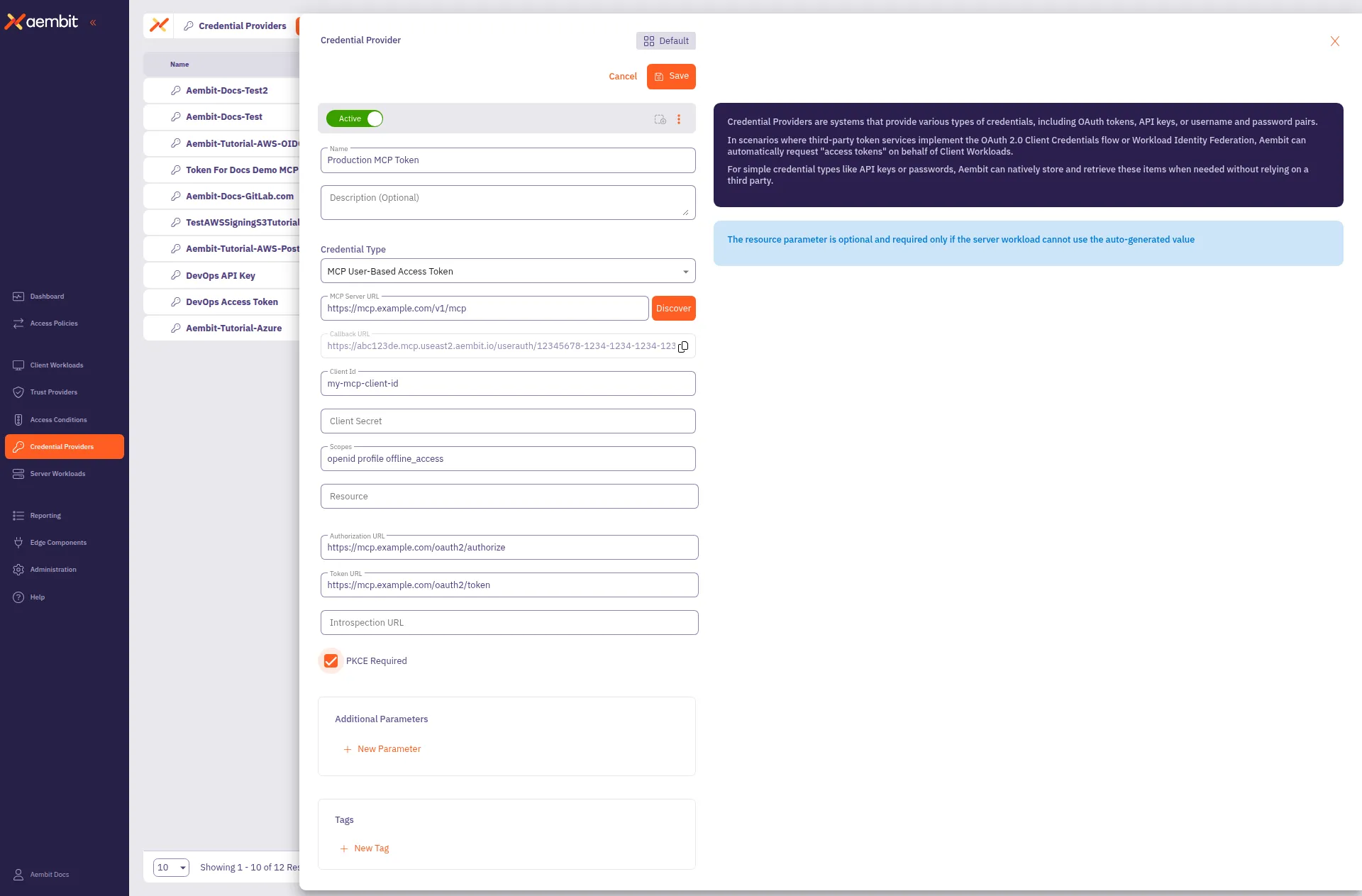
Under Credential Type, select MCP User-Based Access Token, revealing more fields.
-
Fill out the remaining fields:
-
MCP Server URL - The base URL of the target MCP server (for example,
https://dbc-a1044c90-95d9.cloud.databricks.com/api/2.0/mcp). Click Discover to auto-populate the Authorization URL and Token URL from the server’s metadata. -
Callback URL - Auto-generated and read-only. This is the URL Aembit uses to receive OAuth authorization codes during the user consent flow. Share this URL with the MCP server vendor if they require callback URL registration.
-
Client ID - The OAuth client identifier for the MCP server. Obtain this from the MCP server vendor’s configuration or by using a dynamic client registration endpoint.
-
Client Secret - The OAuth client secret, if required by the MCP server.
-
Scopes - Space-separated list of OAuth scopes (for example,
all-apis offline_access). Discover may auto-populate this field. -
Authorization URL - The endpoint where the user authenticates and grants consent. Auto-populated by Discover if the MCP server supports metadata discovery.
-
Token URL - The endpoint that exchanges authorization codes for access tokens. Auto-populated by Discover.
-
Introspection URL - (Optional) The token introspection endpoint, if supported by the MCP server.
-
Resource - (Optional) The resource parameter for the token request. Required only if the MCP server can’t use the auto-generated value. Some providers, such as Microsoft, require this field.
-
PKCE Required - Enable this if the MCP server requires Proof Key for Code Exchange (PKCE). Recommended for security.
-
Lifetime - The expected lifetime of the authorization. Aembit uses this value to send notification reminders before the authorization expires. Default is 1 year.
-
Additional Parameters - (Optional) Key-value pairs for custom parameters to include in the token request.
The form should look similar to the following screenshot:
-
-
Click Save.
Aembit displays the new Credential Provider in the list of Credential Providers.
Related topics
Section titled “Related topics”- About MCP User-Based Access Tokens - How this Credential Provider works and when to use it
- MCP Identity Gateway setup - How to configure Gateway-to-Server Access Policies that use this Credential Provider
- MCP Identity Gateway concepts - How the MCP Identity Gateway uses per-user credentials
- OAuth 2.0 Authorization Code - The standard OAuth flow for administrator-authorized credentials
- Credential Providers overview - All available Credential Provider types