Use the Edge SDK in Azure Functions
An Azure Function App with managed identity enabled can request a Microsoft Entra access token for itself. The Edge SDK presents that token to an OIDC ID Token Trust Provider: Trust Providers validate Client Workload identities through workload attestation, verifying identity claims from the workload's runtime environment rather than relying on pre-shared secrets.Learn more in Aembit, so your function needs no secret to authenticate with Aembit.
This guide covers the parts specific to Azure Functions. For what the SDK does in general, see the Edge SDK overview.
Before you start
Section titled “Before you start”On the Azure side, you need the following:
- A Function App on the Node.js v4 programming model for TypeScript, or the Python v2 programming model for Python.
- Managed identity enabled on the Function App.
- A Microsoft Entra app registration whose Application ID URI represents Aembit as the token audience.
In Aembit, configure an Access Policy: Access Policies define, enforce, and audit access between Client and Server Workloads by cryptographically verifying workload identity and contextual factors rather than relying on static secrets.Learn more with these pieces:
- An OIDC ID Token Trust Provider carrying an Edge SDK Client ID: A structured identifier that Aembit generates when you configure a Trust Provider, encoding your region, tenant, and Trust Provider. It identifies a Trust Provider rather than an individual Client Workload.Learn more.
- A Client Workload: Client Workloads represent software applications, scripts, or automated processes that initiate access requests to Server Workloads, operating autonomously without direct user interaction.Learn more whose
OIDC ID Token Subject identifier
matches the
subclaim in the Entra token. - A Server Workload: Server Workloads represent target services, APIs, databases, or applications that receive and respond to access requests from Client Workloads.Learn more whose Service Endpoint host and port match what your function requests.
- A Credential Provider: Credential Providers obtain the specific access credentials—such as API keys, OAuth tokens, or temporary cloud credentials—that Client Workloads need to authenticate to Server Workloads.Learn more that returns the credential type your function asks for.
Match the Trust Provider’s issuer (iss) rule on your Entra tenant issuer and its audience (aud) rule on the
Application ID URI the function requests a token for.
Where the token comes from
Section titled “Where the token comes from”The function asks Azure for an Entra access token through ManagedIdentityCredential from the Azure Identity library.
That credential uses the Function App’s system-assigned managed identity unless you pass the client ID of a
user-assigned one.
The token request names a scope, which is the Application ID URI followed by /.default.
The default Application ID URI takes the form api://<application-client-id>.
The examples append /.default for you, so leave it off the audience you configure.
Keep the audience stable once you configure Aembit.
To find the sub value your Client Workload identifier has to match, decode a token issued for your audience and copy
its sub claim.
For local development outside Azure, set the AZURE_ENTRA_ACCESS_TOKEN environment variable to an Entra access token.
The function uses that value when it’s present and skips managed identity, which the examples don’t emulate locally.
Write the function
Section titled “Write the function”Both examples build the Trust Provider and the client inside the handler, once per invocation.
The TypeScript example does this so the token function can log through the invocation’s InvocationContext, which this
excerpt trims.
A client built per invocation authenticates again on every request, because its in-memory access token lives only as
long as the client.
The Trust Provider takes a function rather than a string for the token.
The SDK calls that function each time it collects the workload’s identity, so every request presents a current Entra
token.
The SDK rejects an empty token with the trust_provider error kind, so the token function needs no check of its own.
In Python, the parameter is identity_token.
import { app, type HttpRequest, type HttpResponseInit } from "@azure/functions"import { ManagedIdentityCredential } from "@azure/identity"import { EdgeClient, trustProviders } from "@aembit/edge-sdk"
const EXAMPLE_CONFIG = {  baseUrl: "https://<tenant>.ec.<stack>.aembit.io",  clientId: "your-edge-sdk-client-id",  serverHost: "target.example.com",  serverPort: 443,  credentialType: "ApiKey",  resourceSet: undefined as string | undefined,  entraAudience: "api://your-aembit-tenant-app-id-uri",  managedIdentityClientId: undefined as string | undefined}
app.http("aembitAzureEntraOidc", {  methods: ["GET"],  authLevel: "function",  handler: aembitAzureEntraOidc})
export async function aembitAzureEntraOidc(request: HttpRequest): Promise<HttpResponseInit> {  const trustProvider = trustProviders.oidcIdToken({    identityToken: () => resolveAzureEntraToken()  })
  const client = new EdgeClient({    baseUrl: EXAMPLE_CONFIG.baseUrl,    clientId: EXAMPLE_CONFIG.clientId,    trustProvider,    resourceSet: EXAMPLE_CONFIG.resourceSet  })
  const credential = await client.getCredential({    server: { host: EXAMPLE_CONFIG.serverHost, port: EXAMPLE_CONFIG.serverPort },    credentialType: EXAMPLE_CONFIG.credentialType  })
  return {    status: 200,    headers: { "Cache-Control": "no-store" },    jsonBody: {      authenticated: true,      trustProviderId: trustProvider.id,      credentialType: credential.credentialType ?? null,      credentialExpiresAt: credential.expiresAt ?? null,      dataKeys: Object.keys(credential.data)    }  }}
async function resolveAzureEntraToken(): Promise<string> {  const envToken = process.env.AZURE_ENTRA_ACCESS_TOKEN?.trim()  if (envToken) {    return envToken  }
  const scope = `${EXAMPLE_CONFIG.entraAudience}/.default`  const credential = new ManagedIdentityCredential({ clientId: EXAMPLE_CONFIG.managedIdentityClientId })  const accessToken = await credential.getToken(scope)
  return accessToken?.token ?? ""}
import jsonimport osfrom typing import Any
import azure.functions as funcfrom aembit_edge import CredentialServerRef, EdgeClient, EdgeClientConfig, GetCredentialInputfrom aembit_edge.trust_providers import OidcIdTokenTrustProviderfrom azure.identity import ManagedIdentityCredential
EXAMPLE_CONFIG: dict[str, Any] = { "base_url": "https://<tenant>.ec.<stack>.aembit.io", "client_id": "your-edge-sdk-client-id", "server_host": "target.example.com", "server_port": 443, "credential_type": "ApiKey", "resource_set": None, "entra_audience": "api://your-aembit-tenant-app-id-uri", "managed_identity_client_id": None,}
app = func.FunctionApp(http_auth_level=func.AuthLevel.FUNCTION)
@app.route(route="aembitAzureEntraOidc", methods=["GET"])def aembit_azure_entra_oidc(req: func.HttpRequest) -> func.HttpResponse: trust_provider = OidcIdTokenTrustProvider(identity_token=resolve_azure_entra_token)
client = EdgeClient( EdgeClientConfig( base_url=EXAMPLE_CONFIG["base_url"], client_id=EXAMPLE_CONFIG["client_id"], trust_provider=trust_provider, resource_set=EXAMPLE_CONFIG["resource_set"], ) )
credential = client.get_credential( GetCredentialInput( server=CredentialServerRef( host=EXAMPLE_CONFIG["server_host"], port=EXAMPLE_CONFIG["server_port"], ), credential_type=EXAMPLE_CONFIG["credential_type"], ) )
body = { "authenticated": True, "trustProviderId": trust_provider.id, "credentialType": credential.credential_type, "credentialExpiresAt": credential.expires_at, "dataKeys": list(credential.data.keys()), } return func.HttpResponse( body=json.dumps(body), status_code=200, mimetype="application/json", headers={"Cache-Control": "no-store"}, )
def resolve_azure_entra_token() -> str: env_token = os.environ.get("AZURE_ENTRA_ACCESS_TOKEN", "").strip() if env_token: return env_token
scope = f"{EXAMPLE_CONFIG['entra_audience']}/.default" credential = ManagedIdentityCredential(client_id=EXAMPLE_CONFIG["managed_identity_client_id"]) token: str = credential.get_token(scope).token return tokenList azure-functions, azure-identity, and aembit-edge-sdk in the function’s requirements.txt.
The runnable examples in the SDK repository, in TypeScript and Python, add the logging and error handling this excerpt trims, along with build and deployment steps.
The function registers with authLevel: "function" in TypeScript and func.AuthLevel.FUNCTION in Python, so every
caller must present a function key.
Treat the endpoint as a test harness rather than a general credential broker for arbitrary callers.
Fill in your values
Section titled “Fill in your values”Set each value in EXAMPLE_CONFIG at the top of the function:
| TypeScript value | Python value | Where it comes from |
|---|---|---|
baseUrl | base_url | The Edge API base URL in your Aembit Tenant profile. See Get your Aembit Edge API base URL. |
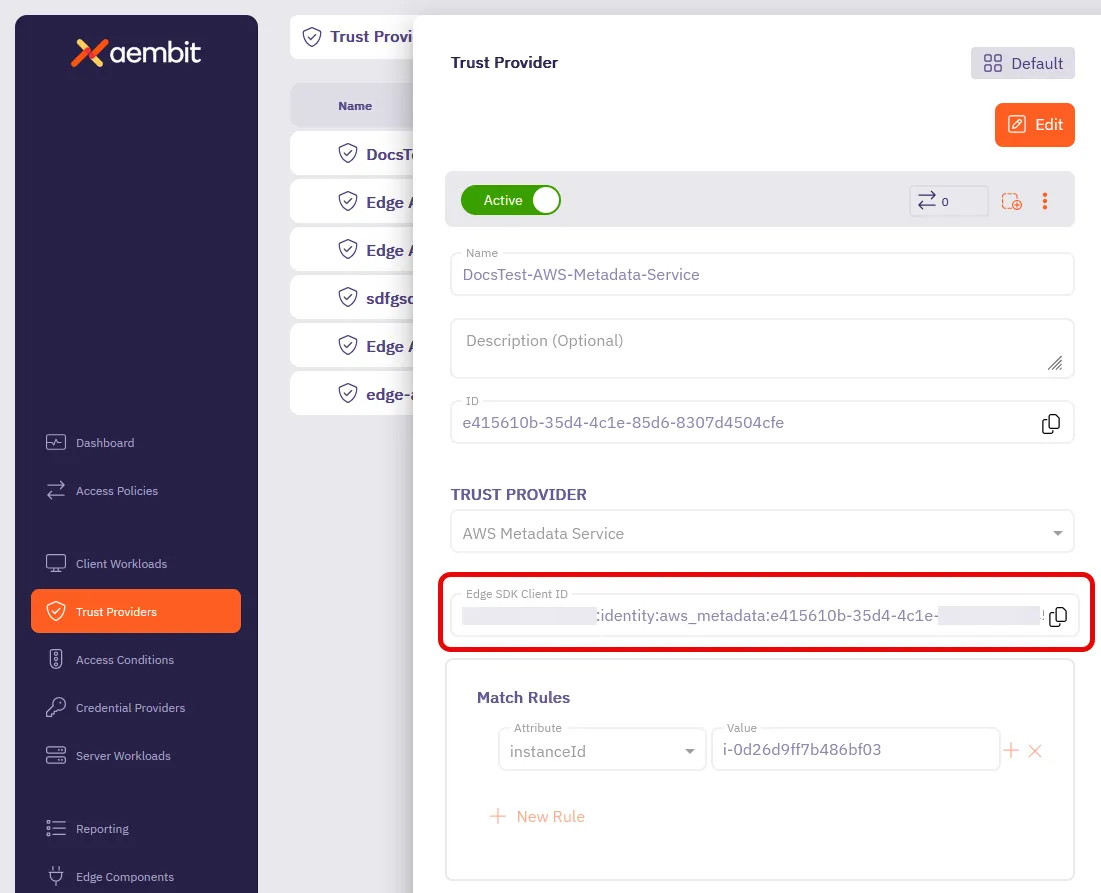
clientId | client_id | The Edge SDK Client ID from your OIDC ID Token Trust Provider. See How to find your Edge SDK Client ID. |
serverHost and serverPort | server_host and server_port | The Host and Port under Service Endpoint on your Server Workload, which Aembit uses to find the Access Policy. Port must be equal, and Host must be equal or match a * wildcard. |
credentialType | credential_type | The credential type your Credential Provider returns, such as ApiKey. |
resourceSet | resource_set | Leave unset unless your Access Policy lives in a non-default Resource Set. It takes the Resource Set ID, not its name. |
entraAudience | entra_audience | The Application ID URI of your Entra app registration, without /.default. |
managedIdentityClientId | managed_identity_client_id | The client ID of a user-assigned managed identity. Leave unset to use the system-assigned identity. |
Use the Edge API base URL from your profile exactly, without a trailing slash.
A baseUrl that redirects can break Edge SDK requests.
A 301, 302, or 303 redirect turns each request into a GET without its body.
In TypeScript, a 307 or 308 redirect to another host lets authentication succeed, then drops the Authorization
header from the credential request, so Aembit returns 401.
In Python, a 307 or 308 redirect fails with that status code.
Check the result
Section titled “Check the result”Call the deployed function with a function key in the x-functions-key header or the code query parameter:
curl -H "x-functions-key: <your-function-key>" \ https://<your-function-app>.azurewebsites.net/api/aembitAzureEntraOidcA working flow reports the credential type and the keys in the payload without printing the secret:
{ "authenticated": true, "trustProviderId": "oidc-id-token", "credentialType": "ApiKey", "credentialExpiresAt": "2026-03-10T19:19:09.2559713Z", "dataKeys": ["apiKey"]}Troubleshooting
Section titled “Troubleshooting”Every error the Edge SDK raises carries a kind, which narrows the failure to one side of the exchange.
Alongside kind, each error carries statusCode, apiCode, and requestId when Aembit supplies them, and retryable
to report whether another attempt might succeed.
The Python SDK names these fields status_code, api_code, request_id, and retryable.
The function fails because no Entra token is available
Section titled “The function fails because no Entra token is available”The SDK reports this failure with the trust_provider error kind, before it contacts Aembit.
Locally, confirm you set AZURE_ENTRA_ACCESS_TOKEN.
In Azure, confirm the Function App has managed identity enabled.
Authentication fails
Section titled “Authentication fails”The SDK raises an error with the auth kind when Aembit rejects the authentication request.
Aembit records no access authorization event for an authentication request, so the status code and these checks are the
evidence you have.
A 400 status means Aembit couldn’t read the Client ID or the Resource Set ID in the request.
Copy the Edge SDK Client ID from the Trust Provider again, and confirm resourceSet holds a Resource Set ID as the
third check in the following list describes.
A 401 status carries the same message whichever check failed.
Work through the checks in order:
-
Confirm
clientId(Pythonclient_id) holds the Edge SDK Client ID of the Trust Provider you set up for this workload. The value ends with that Trust Provider’s ID, so compare the last segment with the ID field in the Trust Provider editor. If they differ, copy the Edge SDK Client ID from the right Trust Provider. -
Confirm the Trust Provider’s toggle reads Active. If it reads Inactive, switch it on in the Trust Provider editor. The change saves at once, after a confirmation dialog when the Trust Provider is in use.
-
Confirm the Trust Provider belongs to the Resource Set the request names.
resourceSet(Pythonresource_set) takes the Resource Set ID, not its name. When you leave it unset, the Trust Provider must belong to the Default Resource Set. To find the ID, select Administration ☰ Resource Sets and hover over the Resource Set name, or open the Resource Set and copy Resource Set ID. To see which Resource Set holds the Trust Provider, select each Resource Set in the selector at the top of the Trust Providers page. -
Confirm the identity evidence passes the Trust Provider’s validation, using the checks after this list where your Trust Provider type has them. Aembit evaluates match rules only after the token or document passes validation, so a validation failure looks like a match rule failure.
-
Confirm the Trust Provider’s match rules hold this workload’s values. Aembit groups the rules by Attribute, and by Key for custom claim rules, and each group needs a matching rule. A Value containing
*matches any run of characters in that position. Any other value must match exactly, including case, unless your Trust Provider’s checks after this list say otherwise. A rule with an empty Value fails the Trust Provider, so fill in the Value or delete the rule. A Trust Provider with no match rules accepts any workload whose evidence passes validation. Compare each rule’s Value with the matching field in real evidence from this workload, and correct the rule.
For an OIDC ID Token Trust Provider, the validation in the fourth check covers two things:
- The token must be inside the validity window its
expandnbfclaims set, with 5 minutes of clock skew allowed. If it has expired, request a new token and retry. - The Method under Attestation Method must verify the token’s signature.
With OIDC Discovery, each OIDC Endpoint must be the token issuer’s base URL, without the
.well-knownpath. With Upload JWKS or Upload Public Key, the key must be the public key of the token’s signer. With Symmetric Key, the key must be the shared secret that signed the token. With Aembit Tenant OIDC ID Token, your Aembit Tenant must have issued the token.
Aembit checks the token’s issuer and audience only through match rules.
The sub, aud, and iss attributes compare the token’s claims of the same name, and custom_claim compares the
claim you name in Key.
Decode a real token and compare each claim with the Value of its rule.
The credential request raises an error
Section titled “The credential request raises an error”The SDK raises an error with the credential kind when the credential request returns an error status.
The error’s message holds the message from Aembit’s response.
When the response carries none, the message reads Edge API request failed with status followed by the status code.
An error with no statusCode (Python status_code) whose message names server.host or server.port comes from the
SDK, which checks those values before it contacts Aembit.
Set server.host to a non-empty string and server.port to a whole number from 1 to 65535.
A 404 status.
Aembit identified the Client Workload and the Server Workload, then couldn’t settle on one Access Policy or one
Credential Provider.
The response carries no message, so check each cause:
- No active Access Policy holds this Server Workload and a Client Workload that matches this workload, or more than one does. More than one Client Workload can match one workload. Count the active Access Policies across every matching Client Workload, and keep exactly one. A new Access Policy saved with Save Policy stays inactive until you switch on its toggle, while Save Policy & Activate saves it as active.
- The Access Policy holds Credential Providers of different types. Keep Credential Providers of one type on the Access Policy.
connectionMetadata(Pythonconnection_metadata) selected none of the Access Policy’s Credential Providers, or more than one. Aembit chooses byconnectionMetadatawhen it carries a filled value:accountName,accessKeyId, bothheaderNameandheaderValue, or bothhttpBodyFieldPathandhttpBodyFieldValue. It chooses this way even when the Access Policy holds one Credential Provider. Leave it unset when the Access Policy holds one Credential Provider, and otherwise set it to values that select exactly one.- The Credential Provider the request selected is inactive. Switch its toggle to Active. Aembit records no access authorization event for this cause.
A 400 status.
When the message is Aembit’s own, Aembit failed while it selected or fetched the credential, and the message says why.
Examples include an error status from the service the Credential Provider calls, and a key missing from a secret the
Credential Provider reads.
Correct the Credential Provider or the service it calls, then retry.
An Access Policy with more than one Credential Provider also returns 400 when connectionMetadata carries no filled
value, or the request carries no connectionMetadata.
An AWS Secrets Manager Value or Azure Key Vault Value Credential Provider with Private Network Access switched on
returns 400 for every credential type the SDK requests.
Switch Private Network Access off on that Credential Provider to retrieve its secret through the Edge SDK.
A 400 whose message reads Edge API request failed with status 400 means Aembit rejected the request before it
looked for a credential.
Confirm credentialType (Python credential_type) is a valid credential type, such as ApiKey or OAuthToken.
When you set certSigningRequest (Python cert_signing_request), confirm it’s valid base64.
When you set resourceSet (Python resource_set), confirm it’s the ID of a Resource Set in your Aembit Tenant.
A 401 status after authentication succeeds.
Confirm baseUrl (Python base_url) is the Edge API base URL from your Aembit Tenant profile, exactly.
In TypeScript, a 307 or 308 redirect to another host drops the Authorization header from the credential request.
The credential comes back empty
Section titled “The credential comes back empty”Aembit returns status 200 for these responses, so the SDK raises no error, and the field your code reads in the
credential’s data is empty.
The credential’s credentialType (Python credential_type) tells the two causes apart.
credentialType matches the type you requested.
Aembit doesn’t compare the requested type with the Credential Provider’s type.
The requested type picks which fields of data Aembit fills, and the response repeats it.
When the two types differ, the credential can arrive in a field your code doesn’t read or come back with no value.
Some Credential Providers raise a 400 credential error instead.
When the Server Workload uses Authentication Method HTTP Authentication with Authentication Scheme Basic, a
Username & Password Credential Provider returns the base64-encoded username:password value in both username and
password.
Request the type that matches the Credential Provider on the Access Policy:
| Credential Provider | credentialType | Fields in data |
|---|---|---|
| API Key | ApiKey | apiKey |
| Username & Password | UsernamePassword | username, password |
| AWS Secrets Manager Value (username and password) | UsernamePassword | username, password |
| AWS Secrets Manager Value (plain text or single value) | None | None, because the Edge API can’t return this secret |
| Azure Key Vault Value (username and password) | UsernamePassword | username, password |
| AWS Security Token Service Federation | AwsStsFederation | awsAccessKeyId, awsSecretAccessKey, awsSessionToken |
| X.509-SVID Certificate | X509Svid | certificate |
| Any other type except AWS Secrets Manager Value | OAuthToken | token |
A request with no credentialType gets OAuthToken.
An X509Svid request also needs certSigningRequest (Python cert_signing_request).
credentialType is Unknown.
Aembit authenticated the workload but returned no credential.
Find the request’s event in Reporting, as Retrieving Access Authorization Event
data describes.
The event records a result for the Client Workload, the Server Workload, the Access Policy, each Trust Provider, and
each Access Condition, and NotFound marks one Aembit couldn’t identify.
Fix the first one that didn’t succeed:
- Server Workload: Aembit compares
server.hostandserver.portwith Host and Port under Service Endpoint, not with Forward to Port. Host matches when it equalsserver.host, and a*in Host matches any run of characters. Aembit doesn’t compare Transport Protocol or the TLS settings. The Server Workload must also be Active and belong to an active Access Policy. - Client Workload: each identifier type under Client Identification must match this workload. Rows of the same type are alternatives, except OIDC ID Token rows with different Claim Name values, which must each match. The Client Workload must also be Active and belong to an active Access Policy. The identifier types that fit this platform appear at the end of this section.
- Trust Provider with the result
Unauthorized: Aembit checks the workload’s evidence again on every credential request. Every active Trust Provider on the Access Policy must attest the workload, and Aembit stops at the first that fails. A Trust Provider this workload can’t satisfy, such as one for another platform, fails every request. Switch off its Active toggle, remove it from the Access Policy, or give the workload its own Access Policy. The event’sreasonnames the check that failed. ForMatchRuleFailed, the event also records theattribute,expectedValueorexpectedValues, andactualValue, so correct that match rule’s Value. When the Trust Provider validates an identity token and the event records noactualValue, Aembit couldn’t compare the rule. Give each match rule a Value, and confirm the token carries each claim the match rules name. For any otherreason, work through the Trust Provider checks in the Authentication fails section of this page. - Access Condition with the result
Unauthorized: meet the condition, or remove it from the Access Policy. - Every entity succeeded: confirm the Access Policy has a Credential Provider.
When the event’s
credentialProviderentry carries areason, Credential failure lists what each reason means.
When a Client Workload uses the Aembit Client ID identifier, the SDK doesn’t read the CLIENT_WORKLOAD_ID
environment variable.
Pass the value in your client configuration instead, as clientWorkloadDetails: { os: { environment: { CLIENT_WORKLOAD_ID: "<value>" } } }, or as the same structure in client_workload_details in Python.
For this platform, OIDC ID Token Subject, OIDC ID Token Issuer, and OIDC ID Token Audience compare the
token’s sub, iss, and aud claims.
How to find your Edge SDK Client ID
Section titled “How to find your Edge SDK Client ID”-
Log in to your Aembit Tenant.
-
Go to the Trust Providers section in the left sidebar.
-
Select the Trust Provider you want to use for Edge API authentication.
-
In the TRUST PROVIDER section, find the Edge SDK Client ID field.
-
Copy the Edge SDK Client ID to use in your authentication requests.