Edge API authentication with Azure Instance Metadata Service
To authenticate with the Aembit Edge API from an Azure virtual machine (VM), you send the attested data document that the Azure Instance Metadata Service (IMDS) signs for that VM. Aembit validates the document’s signature against pinned Microsoft and DigiCert root certificates, then matches the VM ID, subscription ID, and image SKU it carries against your Trust Provider: Trust Providers validate Client Workload identities through workload attestation, verifying identity claims from the workload's runtime environment rather than relying on pre-shared secrets.Learn more.
Your workload never handles a client secret or certificate. IMDS is reachable only from the VM itself, and it signs a fresh document on each request.
Prerequisites
Section titled “Prerequisites”To authenticate using the Azure Instance Metadata Service, you must have the following:
- Your Trust Provider’s Edge SDK Client ID: A structured identifier that Aembit generates when you configure a Trust Provider, encoding your region, tenant, and Trust Provider. It identifies a Trust Provider rather than an individual Client Workload.Learn more (how to find it)
- An Azure Instance Metadata Service Trust Provider in Aembit, with match rules on the VM ID, subscription ID, or image SKU
- An Azure VM running your workload, with IMDS reachable at
169.254.169.254 - Shell access to that VM
Aembit evaluates match rules against the signed document rather than the plaintext instance metadata, so every value in your match rules must belong to the VM sending the request.
Authenticate with the Azure Instance Metadata Service
Section titled “Authenticate with the Azure Instance Metadata Service”To authenticate with the Aembit Edge API using the Azure Instance Metadata Service, follow these steps:
-
Open a shell on the Azure VM and generate a nonce.
Use a 10-digit number, such as the current Unix timestamp:
Terminal window NONCE=$(date +%s)Terminal window $nonce = [string][DateTimeOffset]::UtcNow.ToUnixTimeSeconds()Aembit compares the nonce you send against the nonce inside the signed document, which proves the document was issued for this request rather than replayed from an earlier one.
-
Request the attested data document from IMDS, passing the nonce:
Terminal window curl -s -H "Metadata:true" \"http://169.254.169.254/metadata/attested/document?api-version=2025-04-07&nonce=$NONCE"Terminal window Invoke-RestMethod -Headers @{Metadata="true"} `-Uri "http://169.254.169.254/metadata/attested/document?api-version=2025-04-07&nonce=$nonce"The
Metadata:trueheader is required. IMDS rejects any request that omits it.You should get output similar to the following:
{"encoding": "pkcs7","signature": "MIILlAYJKoZIhvcNAQcCoIILhTCCC4ECAQExDzANBgkqhkiG9w0BAQsFADCB..."}The
signaturevalue is a Base64-encoded PKCS#7 container. It holds the signed instance document and the certificate chain that Aembit validates. -
Confirm the VM reports the values in your match rules:
Terminal window curl -s -H "Metadata:true" "http://169.254.169.254/metadata/instance/compute?api-version=2021-02-01"Terminal window Invoke-RestMethod -Uri "http://169.254.169.254/metadata/instance/compute?api-version=2021-02-01" `-Headers @{Metadata="true"}Each JSON field uses the same name as its Match Rule attribute:
vmId,subscriptionId, andsku. A mismatch here fails attestation even though the signature is valid. -
Construct the authentication request payload using the
clientId,signature, andnoncefrom the previous steps.It should look something like this:
Terminal window {"clientId": "<edge-sdk-client-id>","client": {"azure": {"attestedDocument": {"encoding": "pkcs7","signature": "<base64-pkcs7-signature>","nonce": "<nonce>"}}}} -
Send the authentication request to your Aembit Edge API endpoint:
Terminal window curl --location 'https://<your-aembit-edge-url>/edge/v1/auth' \--header 'Content-Type: application/json' \--data '{"clientId": "your-edge-sdk-client-id","client": {"azure": {"attestedDocument": {"encoding": "pkcs7","signature": "MIILlAYJKoZIhvcNAQcCoIILhTCCC4ECAQExDzANBgkqhkiG9w0BAQsFADCB...","nonce": "1769996400"}}}}'When successful, you’ll receive output similar to:
{"accessToken": "eyJhbGciOiJSUzI1NiIsImtpZCI6IkpyR3JLQ0x6RVFN...","tokenType": "Bearer","expiresIn": 3600} -
Use the
accessTokenas thebearerTokenin subsequent API calls to authenticate your requests. This token is valid for the duration specified inexpiresIn(in seconds).The attested data document expires shortly after IMDS issues it. Request a new document with a new nonce each time you re-authenticate rather than caching one.
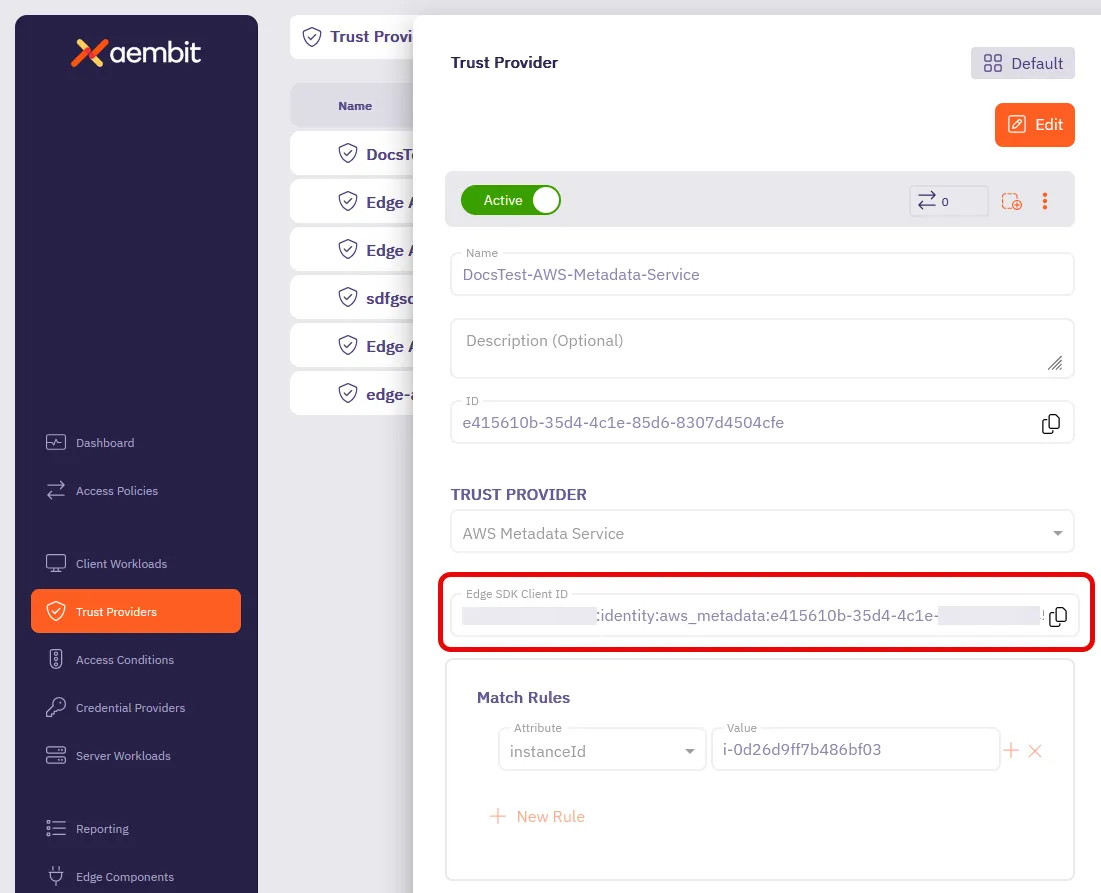
How to find your Edge SDK Client ID
Section titled “How to find your Edge SDK Client ID”-
Log in to your Aembit Tenant.
-
Go to the Trust Providers section in the left sidebar.
-
Select the Trust Provider you want to use for Edge API authentication.
-
In the TRUST PROVIDER section, find the Edge SDK Client ID field.
-
Copy the Edge SDK Client ID to use in your authentication requests.