Use the Edge SDK on Google Cloud Run
A Cloud Run function already has an identity. Google attaches a service account to the runtime and issues signed identity tokens for it through the metadata server. The Edge SDK presents that token as proof of who the workload is, so your function needs no secret to authenticate with Aembit.
This guide covers the parts specific to Cloud Run. For what the SDK does in general, see the Edge SDK overview.
Before you start
Section titled “Before you start”On the Google side, you need a Cloud Run runtime with a service account attached. The function reaches the metadata server over the internal network, so that path needs no extra configuration.
In Aembit, configure an Access Policy: Access Policies define, enforce, and audit access between Client and Server Workloads by cryptographically verifying workload identity and contextual factors rather than relying on static secrets.Learn more with these pieces:
- A Client Workload: Client Workloads represent software applications, scripts, or automated processes that initiate access requests to Server Workloads, operating autonomously without direct user interaction.Learn more that uses the GCP Identity Token Client Identifier.
- A GCP Identity Token Trust Provider.
- A Server Workload: Server Workloads represent target services, APIs, databases, or applications that receive and respond to access requests from Client Workloads.Learn more whose Service Endpoint host and port match what your function requests.
- A Credential Provider: Credential Providers obtain the specific access credentials—such as API keys, OAuth tokens, or temporary cloud credentials—that Client Workloads need to authenticate to Server Workloads.Learn more that returns the credential type your function asks for.
Both the Client Workload identifier and the Trust Provider: Trust Providers validate Client Workload identities through workload attestation, verifying identity claims from the workload's runtime environment rather than relying on pre-shared secrets.Learn more match on the
email claim in the Google token, which is the service account address.
Where the token comes from
Section titled “Where the token comes from”The function asks the metadata server for an identity token at call time:
http://metadata.google.internal/computeMetadata/v1/instance/service-accounts/default/identityThe request has two requirements.
The request needs the Metadata-Flavor: Google header.
Google rejects the request otherwise, which keeps a stray browser or proxy request from reaching instance credentials.
The request also needs an audience query parameter, because Google issues no token without one.
Set it to your Aembit identity host:
https://<tenant>.id.<stack>.aembit.ioAembit matches on the token’s email claim rather than the audience, which exists only because Google requires it.
Setting the audience to the identity host keeps the token scoped to Aembit.
The audience host uses the id subdomain, and baseUrl uses the ec subdomain.
Check both values before you deploy.
Write the function
Section titled “Write the function”Create the Trust Provider and the client once, outside the handler.
Cloud Run reuses warm instances, so a client built at module scope keeps the in-memory access token across invocations
instead of authenticating again on every request.
Passing identityToken a function rather than a string makes that safe, because the SDK then fetches a fresh token
only when it needs one.
import { EdgeClient, trustProviders } from "@aembit/edge-sdk"
const CONFIG = {  baseUrl: "https://<tenant>.ec.<stack>.aembit.io",  clientId: "your-edge-sdk-client-id",  serverHost: "target.example.com",  serverPort: 443,  credentialType: "ApiKey",  audience: "https://<tenant>.id.<stack>.aembit.io"}
const trustProvider = trustProviders.gcpIdentityToken({  identityToken: () => fetchIdentityToken(CONFIG.audience)})
const client = new EdgeClient({  baseUrl: CONFIG.baseUrl,  clientId: CONFIG.clientId,  trustProvider})
export async function aembitGcpIdentityToken(req, res) {  const credential = await client.getCredential({    server: { host: CONFIG.serverHost, port: CONFIG.serverPort },    credentialType: CONFIG.credentialType  })
  res.status(200).json({    credentialType: credential.credentialType,    expiresAt: credential.expiresAt,    dataKeys: Object.keys(credential.data)  })}
async function fetchIdentityToken(audience: string): Promise<string> {  const url = new URL(    "http://metadata.google.internal/computeMetadata/v1/instance/service-accounts/default/identity"  )  url.searchParams.set("audience", audience)
  const response = await fetch(url, {    headers: { "Metadata-Flavor": "Google" }  })
  if (!response.ok) {    throw new Error(`Metadata server returned ${response.status}`)  }
  return (await response.text()).trim()}
The runnable example in the SDK repository adds the error handling this excerpt trims.
Set the function entry point to aembitGcpIdentityToken when you create the function, in the console or through
gcloud.
Google routes requests to the registered handler by that name, so a mismatched entry point deploys and then fails at
invocation.
Fill in your values
Section titled “Fill in your values”-
Set
baseUrlto your tenant’s Edge host.The form is
https://<tenant>.ec.<stack>.aembit.io. -
Set
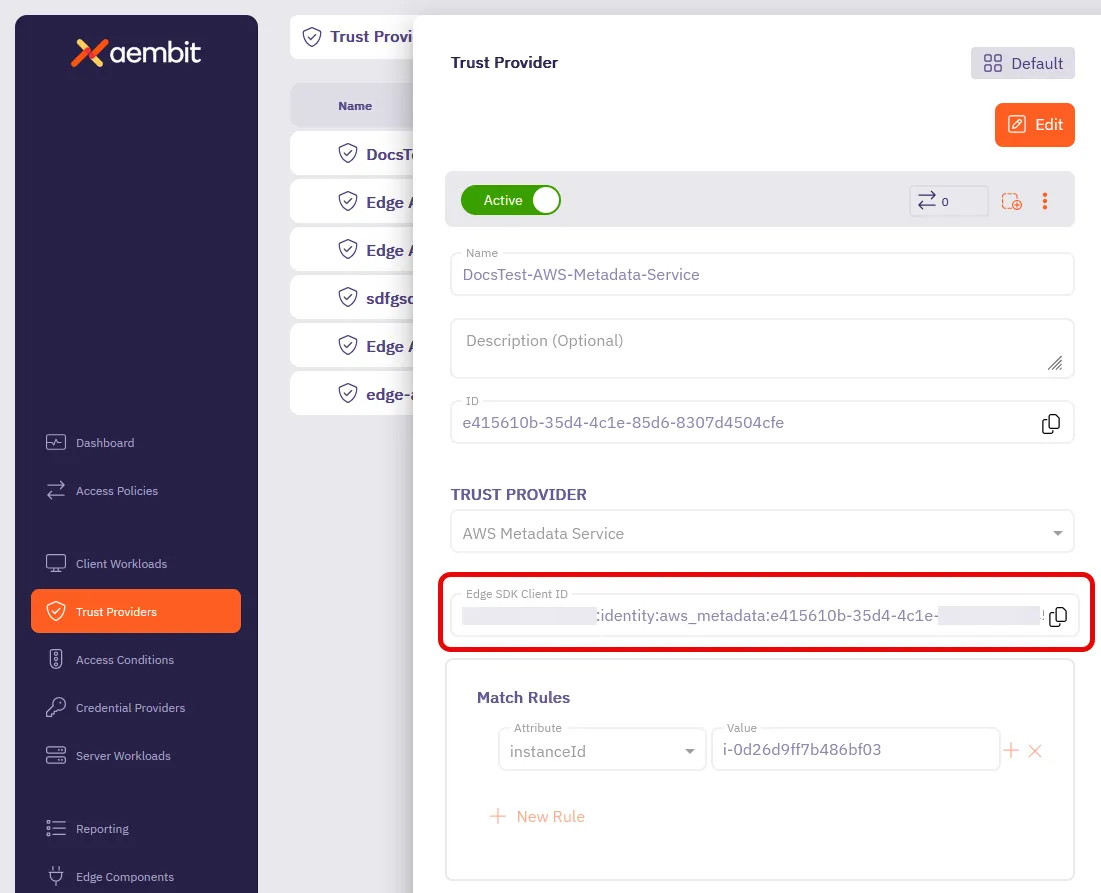
clientIdto the Edge SDK Client ID: A structured identifier that Aembit generates when you configure a Trust Provider, encoding your region, tenant, and Trust Provider. It identifies a Trust Provider rather than an individual Client Workload.Learn more from your GCP Identity Token Trust Provider. -
Set
serverHostandserverPortto the Service Endpoint on your Server Workload.These must match what you configured in Aembit exactly. A mismatch returns a response that looks successful but carries no credential.
-
Set
credentialTypeto the type your Credential Provider returns, such asApiKey. -
Set
audiencetohttps://<tenant>.id.<stack>.aembit.io.
If your tenant uses Resource Sets, pass resourceSet to EdgeClient as well.
Check the result
Section titled “Check the result”Invoke the function and read the JSON it returns. A working flow reports the credential type and the keys in the payload without printing the secret:
{ "credentialType": "ApiKey", "expiresAt": "2026-03-10T19:19:09.2559713Z", "dataKeys": ["apiKey"]}Troubleshooting
Section titled “Troubleshooting”The function can’t get a token.
Confirm the runtime has a service account attached and that the metadata request carries the Metadata-Flavor: Google
header.
Aembit returns 401.
The service account email in the token has to match both the Client Workload identifier and the Trust Provider match
rule.
Check the clientId too.
You get 200 back, but the credential type is Unknown and dataKeys is empty.
The request reached Aembit and failed to match an Access Policy.
serverHost and serverPort are the usual cause, followed by credentialType, and then resourceSet if your tenant
uses one.
How to find your Edge SDK Client ID
Section titled “How to find your Edge SDK Client ID”-
Log in to your Aembit Tenant.
-
Go to the Trust Providers section in the left sidebar.
-
Select the Trust Provider you want to use for Edge API authentication.
-
In the TRUST PROVIDER section, find the Edge SDK Client ID field.
-
Copy the Edge SDK Client ID to use in your authentication requests.