Use the Edge SDK in an AWS Lambda function
An AWS Lambda function authenticates to Aembit through the AWS Role Trust Provider: Trust Providers validate Client Workload identities through workload attestation, verifying identity claims from the workload's runtime environment rather than relying on pre-shared secrets.Learn more, which verifies the function’s execution role. The Edge SDK signs the request that proves the role and runs the authentication exchange. You configure the SDK client and request a credential.
How a Lambda function proves its identity
Section titled “How a Lambda function proves its identity”AWS injects temporary credentials for the function’s execution role into the runtime environment. The Edge SDK uses those credentials to sign an AWS Security Token Service (STS) GetCallerIdentity request with AWS Signature Version 4, then sends the signed request data to Aembit.
Aembit calls GetCallerIdentity with that signed request.
AWS answers with the identity behind the signature.
Aembit evaluates that identity against the Match Rule: Match Rules are the conditions a Trust Provider evaluates against a workload's attested identity claims, determining which workloads that Trust Provider accepts.Learn more on your AWS Role Trust
Provider.
Because AWS performs the verification, the signature is what establishes the function’s identity, and the SDK never
sends the role credentials themselves.
For the request and response shapes behind that exchange, see Edge API authentication with AWS Lambda.
Before you start
Section titled “Before you start”- An Aembit Tenant: Aembit Tenants serve as isolated, dedicated environments within Aembit that provide complete separation of administrative domains and security configurations.Learn more with at least Read Only permission for Trust Providers.
- An Access Policy: Access Policies define, enforce, and audit access between Client and Server Workloads by cryptographically verifying workload identity and contextual factors rather than relying on static secrets.Learn more for the service your function reaches.
- An AWS Role Trust Provider with match rules that identify your function’s execution role.
- A Lambda function on a Node.js 20 or later runtime, with an execution role attached.
Get your Edge SDK Client ID
Section titled “Get your Edge SDK Client ID”Your function needs the Edge SDK Client ID: A structured identifier that Aembit generates when you configure a Trust Provider, encoding your region, tenant, and Trust Provider. It identifies a Trust Provider rather than an individual Client Workload.Learn more from the
AWS Role Trust Provider whose match rules
identify your function’s execution role.
Lambda execution roles match on accountId and roleArn, where the roleArn takes the form
arn:aws:sts::<accountId>:assumed-role/<functionRoleName>/<functionName>.
-
Log in to your Aembit Tenant.
-
Go to the Trust Providers section in the left sidebar.
-
Select the Trust Provider you want to use for Edge API authentication.
-
In the TRUST PROVIDER section, find the Edge SDK Client ID field.
-
Copy the Edge SDK Client ID to use in your authentication requests.
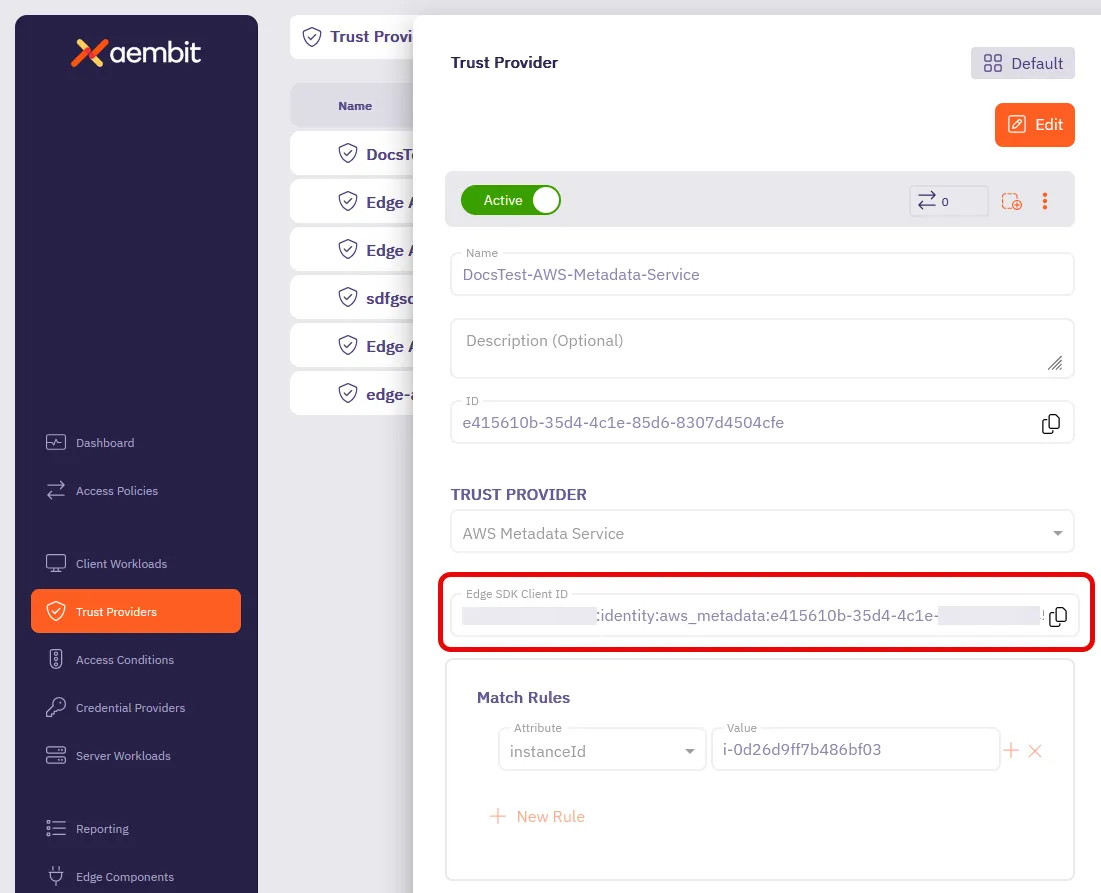
Your Client Workload: Client Workloads represent software applications, scripts, or automated processes that initiate access requests to Server Workloads, operating autonomously without direct user interaction.Learn more also needs an identification method.
To identify the function by its Amazon Resource Name (ARN), use
AWS Lambda ARN identification.
To identify it by an explicit value instead, use Aembit Client ID identification and pass that value through the
CLIENT_WORKLOAD_ID environment variable.
Wire up the SDK
Section titled “Wire up the SDK”The example collects every value you change into one EXAMPLE_CONFIG object at the top of the file.
The AWS Role Trust Provider also needs a region, which the example resolves from the environment rather than from
EXAMPLE_CONFIG.
const EXAMPLE_CONFIG = { baseUrl: "https://<tenant>.ec.<stack>.aembit.io", clientId: "your-edge-sdk-client-id", serverHost: "target.example.com", serverPort: 443, credentialType: "ApiKey", resourceSet: undefined as string | undefined}Where each value comes from in Aembit:
| Value | Where it comes from |
|---|---|
baseUrl | The Edge API Base URL field in your Aembit Tenant profile. See Get your Aembit Edge API base URL. |
clientId | The Edge SDK Client ID you copied from the Trust Provider. |
serverHost and serverPort | The Service Endpoint on your Server Workload: Server Workloads represent target services, APIs, databases, or applications that receive and respond to access requests from Client Workloads.Learn more, matched exactly, because Aembit resolves the Access Policy from these values. |
credentialType | The credential type your Credential Provider: Credential Providers obtain the specific access credentials—such as API keys, OAuth tokens, or temporary cloud credentials—that Client Workloads need to authenticate to Server Workloads.Learn more returns. |
resourceSet | Leave undefined unless your Access Policy lives in a non-default Resource Set. |
The function reads the rest of what it needs from environment variables:
| Variable | Required | Source |
|---|---|---|
AWS_REGION | Yes | Lambda sets this automatically |
AWS_DEFAULT_REGION | Only when testing outside Lambda | You set it in your local environment |
CLIENT_WORKLOAD_ID | Only with Aembit Client ID identification | You set it on the function’s configuration |
The example throws Missing AWS region. Set AWS_REGION or AWS_DEFAULT_REGION. when it can resolve neither variable,
so a function tested outside Lambda must set one of them itself.
Run the example
Section titled “Run the example”The Edge SDK repository carries a runnable version of this integration, including its build, packaging, and deployment steps.
Troubleshooting
Section titled “Troubleshooting”Every error the Edge SDK raises carries a kind, which narrows the failure to one side of the exchange.
- Missing AWS region: The example resolved neither
AWS_REGIONnorAWS_DEFAULT_REGIONand threw before contacting Aembit. Lambda normally setsAWS_REGION, so check this first when running the handler outside Lambda. auth: Aembit received the signedGetCallerIdentityrequest and rejected it. ConfirmclientIdholds the Edge SDK Client ID from the AWS Role Trust Provider. Confirm the Trust Provider’s match rules identify the function’s execution role.credential: Aembit authenticated the function but returned no credential for the service you requested, socredentialTypecomes back asUnknownwith no data. Confirm that the Service Endpoint on your Server Workload exactly matchesserverHostandserverPort, because Aembit resolves the Access Policy from those values. Confirm the Access Policy includes the Client Workload for this function. Confirm the Credential Provider on that policy returns thecredentialTypeyour function requested. When your Client Workload uses Aembit Client ID identification, confirm the function setsCLIENT_WORKLOAD_ID.
Alongside kind, each error carries statusCode, apiCode, and requestId when Aembit supplies them, and retryable
to report whether another attempt might succeed.
Include requestId when you contact Aembit Support.