Skip to content

MCP Identity Gateway 1.30 release

Aembit has released MCP Identity Gateway version 1.30.4549.

For the latest available versions of these components, see the Edge Components Supported Versions page.

Key Updates:

  • The Gateway now authenticates requests before proxying them to upstream MCP servers (new default behavior)
  • MCP responses include tool annotations
  • The Gateway returns HTTP 405 for GET requests to the MCP endpoint
  • Unauthorized (401) responses now include additional metadata for easier troubleshooting
  • The Gateway forwards errors from upstream MCP servers to MCP clients
  • The Gateway honors the AEMBIT_TRUSTED_ISSUER_DOMAINS environment variable for trusted issuer configuration
  • A new metrics endpoint provides Gateway operational metrics on a configurable port
  • Improved compatibility with Claude Desktop and other MCP clients
  • Improved handling of MCP servers that don’t support resources
  • General improvements to session management, installer reliability, and internal performance

MCP Authorization Server now supports unauthenticated flows

Aembit’s MCP Authorization Server now supports OAuth flows that don’t require end-user authentication. This enables use cases like ChatGPT apps and other MCP integrations where user sign-in isn’t needed or desired.

What’s new:

  • An Enforce SSO option on Client Workloads with the Redirect URI identifier type. Enforce SSO is on by default, preserving the current behavior of requiring user authentication.
  • When Enforce SSO is on, a multi-select dropdown lets you choose which SSO identity providers appear on the MCP authentication page. By default, the dropdown selects all configured identity providers.
  • When Enforce SSO is off, the MCP Authorization Server issues access tokens without redirecting users to an identity provider. The flow needs no Trust Provider, but a Credential Provider is still required.
  • Access Policies still apply as an authorization control. You can turn off policies or entities to block token issuance.

To use this feature, edit your Client Workload, select the Redirect URI client identifier, and configure Enforce SSO under MCP Authorization Configuration.

For details, see Authentication support and MCP Authorization Server architecture.

MCP Identity Gateway now supports MCP resources

Aembit has released MCP Identity Gateway version 1.29.4419.

Key Updates:

  • MCP resource support for the Identity Gateway

The MCP Identity Gateway now proxies MCP resource requests alongside tool requests. MCP servers that expose resources, such as files, database schemas, or application data, are now accessible through the Gateway. The same identity-aware access policies, credential isolation, and audit logging that govern tool invocations apply.

What’s new:

  • resources/list discovers available resources across all assigned MCP servers. The Gateway fans out the request and aggregates results from all connected servers.
  • resources/read retrieves a specific resource by URI from the appropriate MCP server.

No action required. Resource support is available automatically after upgrading to MCP Identity Gateway 1.29.4419. Your existing access policies, Trust Providers, and Credential Providers apply to resource requests with no configuration changes.

For details, see MCP resource support.

MCP Identity Gateway enters beta with MCP Server and component copying

Aembit now offers an MCP Identity Gateway (Beta) that sits between AI agents and MCP servers, enforcing Access Policies, performing secure token exchange, and providing visibility into MCP activity. Deployed on a Linux VM, the Gateway ensures AI agents never hold direct credentials for enterprise systems.

Key capabilities:

  • Proxies MCP traffic with identity-aware policy enforcement
  • Performs secure token exchange using OAuth 2.0 and API key credentials
  • Provides per-user credential management and centralized MCP routing
  • Logs agent identity, user identity, and policy decisions for auditability
  • Fail-closed behavior—denies access by default unless explicitly allowed

For setup instructions and architecture details, see MCP Identity Gateway.


Aembit now provides an MCP Server that enables AI agents and users to query Aembit event logs using structured commands. Built on the Model Context Protocol specification, the MCP Server enables agentic observability and auditability for organizations using Aembit.

Key capabilities:

  • Query audit logs, authorization events, and workload events
  • Integrations with MCP Inspector, Claude Code, GitHub Copilot, and Visual Studio
  • Resource-set-based access scoping for least-privilege access
  • Read-only access—no create, update, or delete operations
  • Full audit trail of all MCP Server queries

For setup and connection guides, see Aembit MCP Server.


Aembit has added a new MCP User-Based Access Token Credential Provider type. This type enables per-user OAuth credentials for MCP servers using the OAuth 2.0 Authorization Code flow. The MCP Identity Gateway manages user-specific tokens when connecting to downstream MCP servers.

Key capabilities:

  • OAuth 2.0 Authorization Code flow with Proof Key for Code Exchange (PKCE) support
  • MCP Server URL discovery with auto-population of OAuth endpoints
  • Per-user credential scoping
  • Token introspection and lifetime management

For configuration details, see MCP User-Based Access Token Credential Provider.


Aembit now supports component copying between Resource Sets. You can replicate Access Policy components—including Client Workloads, Server Workloads, Trust Providers, Credential Providers, and Access Conditions—from one Resource Set to another. You can also copy entire Access Policies with all related components at once.

Key capabilities:

  • Copy individual components or entire Access Policies between Resource Sets
  • Each copy receives a unique identifier while the original remains unchanged
  • Supports environment promotion, regional deployments, and safe experimentation

For details, see About component copying and Copy components.
GitHub Action, MCP Authorization Server beta, and Access Policy Builder now available

Aembit now provides an official GitHub Action for injecting credentials into your CI/CD workflows. The action retrieves credentials from Aembit and makes them available to subsequent steps in your workflow.

Key capabilities:

  • Retrieve credentials using workload identity federation with GitHub’s OIDC tokens
  • Support for AWS, Azure, database, and API key credential types
  • Automatic credential masking in workflow logs

For setup instructions, see the GitHub Actions tutorial. For usage examples with different credential types, see the how-to guide.


Aembit now supports Private Network Access (PNA) for the AWS Secrets Manager Credential Provider. This allows your Aembit Edge components (Aembit CLI or Agent Proxy) to retrieve secrets directly from AWS Secrets Manager instances in private networks, such as AWS VPCs with private endpoints.

Key capabilities:

  • Retrieve secrets from AWS Secrets Manager without exposing your VPC to the public internet
  • Works with both Aembit CLI and Agent Proxy deployments
  • No changes required to your existing AWS IAM policies or VPC endpoint configuration

For configuration details, see Private Network Access for Credential Providers and AWS Secrets Manager Credential Provider.


Aembit has released the MCP Authorization Server (beta), which secures Model Context Protocol (MCP) workloads using OAuth 2.1 authorization flows. This enables you to apply Aembit Access Policies to AI agents and MCP clients, controlling which users can access which MCP servers.

Key capabilities:

  • OAuth 2.1 authorization code flow implementation for MCP-compliant workloads
  • Dynamic Client Registration support for tools like Claude Desktop and Gemini CLI
  • Integration with OIDC and SAML identity providers for user authentication
  • Access Policies with time and location-based conditions

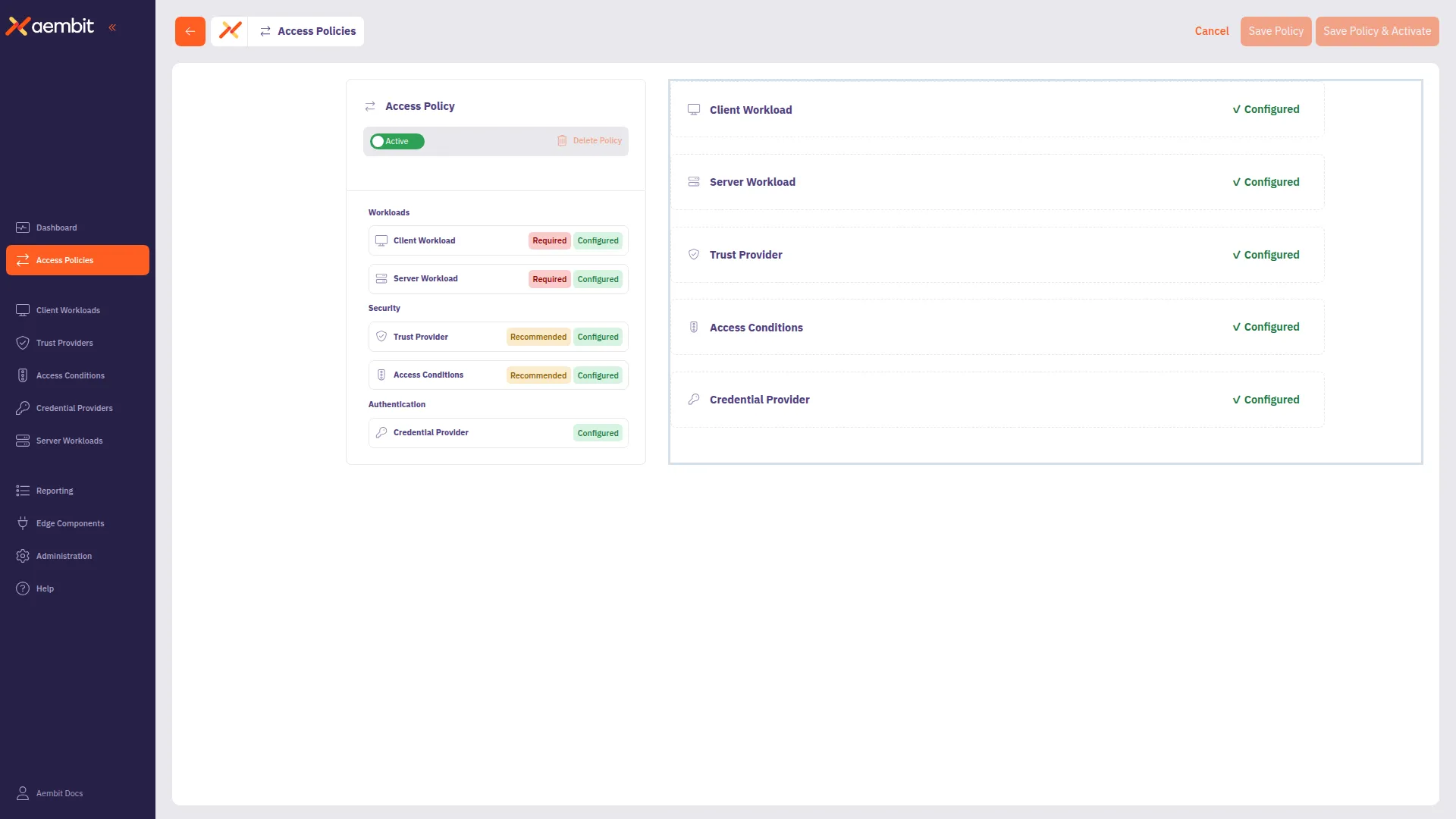
Aembit has redesigned the Access Policy creation experience with the new Access Policy Builder. The builder provides a card-based interface that guides you through configuring each component of an Access Policy.

Access Policy Builder showing a completed policy configuration

Key capabilities:

  • Visual card-based navigation for policy components
  • Inline creation of Client Workloads, Server Workloads, Trust Providers, and other components
  • Clear indicators for required, recommended, and optional components based on Global Policy Compliance settings

To use the new builder, enable Use new access policy in your user profile preferences. For a walkthrough, see Create an Access Policy.